German and UK Truck Simulator

By Featured Game Engine, Game Engines, german truck simulator, truck simulator, UK truck simulator
We can’t quite remember our search terms on game engines this morning but we stumbled upon a game entitled ‘German Truck Simulator’.
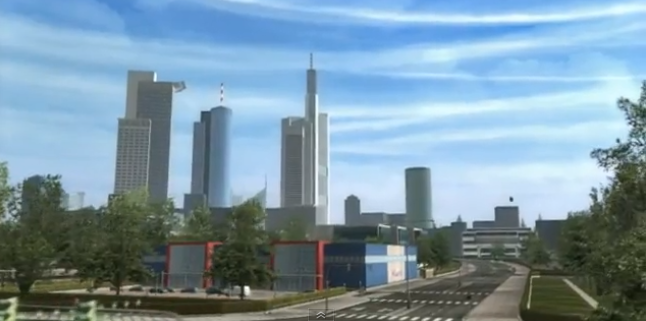
The game allows you to drive across a realistic depiction of Germany, visit its cities, choose from over sixty kinds of cargo, and deliver them. The game progresses by growing your truck fleet and hire the most experienced drivers to build up a business:

The game has been developed by the makers of simulations in the 18 Wheels of Steel series and authors of Euro Truck Simulator. There is quite a niche market for this type of game although the web page states that ‘we are happy to confirm that the game has been released in Poland – a country where we know our games have lots of fans’.
Here is the official Polish game website: germantrucksimulator.pl.
It would be easy to put in a few jokes here and there, but in terms of simulation and visualisation this has got potential and we note there is now a UK version:
The UK version was relased last week, ever had a craving to drive the motorways of the UK and chose between over sixty kinds of cargo to deliver? Head over to http://www.uktrucksimulator.com/ for full details.
The the 1-hour trail demo version of the UK game is not available until April 19th, 2010 but you can download the German version now.
Do let us know how you get on if you do, happy trucking.

Carling Cup Final using Tweet-o-Meter

By carling cup final, Tweet-o-Meter, Twitter
Part of our remit for e-Science here at CASA and du is to use our research in new and innovative ways to get it out into the field. Indeed thats what the blog is all about, sharing our work and the science/techniques behind it. As such this weekend Carling Carling is positioning this weekend’s Carling Cup Final as the “first digital cup final” and is asking fans to take part in the biggest-ever live Twitter commentary during the game using our Tweet-o-Meter.

The Molson Coors lager brand is aiming to get fans talking about the game, which sees Aston Villa take on Manchester United, on the social networking site by using the hash tag #CCF10 and submitting their comments to @thecarlingcup.

The sponsor will track the levels of activity across the social media platform as well as the topics supporters are discussing around the game via a new Tweet-o-Meter, which the brewer has created in partnership with us here at the Centre for Advanced Spatial Analysis, part of the University College London.

Carling brand director, Martin Coyle, says: “Our ambition is always to give fans a bigger voice and get them involved with the competition every step of the way – the great thing about digital activity is that it gives everyone the opportunity to have their say in what should be a superb occasion.

“With all the activity we’ve got lined up on Sunday we genuinely believe that this is the first ever digital cup final. It should be a cracking game and if our activity can add a little more to the overall experience then it’ll be a great way to celebrate 50 years of the competition.”

Your be able to view the results via our customised Tweet-o-Meter over the weekend on Sky Sports and online, we will put a link up as soon as its ready.

In the meantime our city Tweet-o-Meter continues to ‘mine’ the cities for social trends…

Tutorial: Photoshop Image Stacking for Day Trails

By Day Trails, Image Stacking, Tutorial

Creating star trails is a well known technique in Astrophotography and the same technique can be used to create trails of activity during the day. The results are both unique and potentially useful to identify heavily used routes or flows in urban areas.

You will need:

1 x Timelapse System, you can use a simple webcam as per our previous Tutorial: Torch + Webcam = HD Timelapse System a DSLR such as the Canon G9 with CHDK , a iPhone with the free  Gorrilacam app or any camera that can take photos at regular intervals.

1 x Copy of Photoshop, you can download a 30 day trial.

1 x Photoshop Stacking Action (thanks to Deep Space Astrophotography)

Time Taken, 2 Hours (including capture and processing).

Setting Up

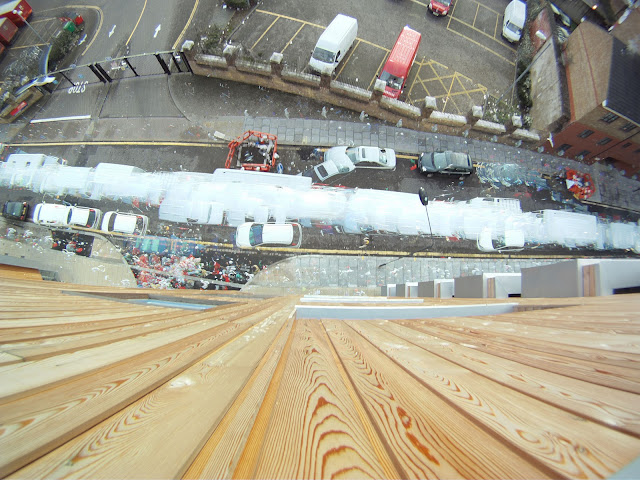
The concept is simple, set up your camera, webcam or iphone at a suitable location, and capture an image at regular intervals, for our example we captured an image every 2 seconds pointing down at a London street:

We left the camera running for an hour capturing 1800 images, saved into a folder on our computer.

The next step is to open photoshop and start stacking the images.

Image Stacking in Photoshop

The images will be stacked onto of an intially blank image via a simple automated action:

1) Create a new blank black image the same size are your captured photographs.

2) Load the action into the action windows in Photoshop and load the action Startrails.atn.

3)  In Photoshop click ‘File’, ‘Automate’ and ‘Batch’. Select the action you have just loaded and choose your directory with the images as source and make sure you select ‘None’ for the output directory.

Click ‘Ok’ and leave it running, our Mac laptop took around an hour to stack the images – resulting in the ‘Day Trail’ below:

You can clearly see the path of the traffic and the most utilised sections of the walkways over the hour, we simply like the effect.

We have created a Day Trail pool on Flickr if you create a stacked image feel free to add it to the pool…
Close Menu

About Salient

The Castle
Unit 345
2500 Castle Dr
Manhattan, NY

T: +216 (0)40 3629 4753
E: hello@themenectar.com

Archives