
Digital Urban 1000 Posts

By digital urban

We have just hit the grand old age of 1000 posts. Digital Urban has been running for just under 3 years now and as you may of noticed the format and rate of posting has changed from time to time.

At the moment we are introducing new tutorials and widening the remit a little into areas such as video manipulation, data visualisation, simulation and other topics concerned with the digital city.

This is probably our first self congratulatory post but hey after a good 200,000 words we hope our posts have helped, inspired or just simply proved a good read from time to time…

Video Tracking and Manipulation: Adobe and University of Washington

By Adobe, computer vision, image tracking, Pedestrian Tracking

Video tracking has huge potential for communicating issues of place and space in the urban environment as well as for data tagging and data collection for use in a GIS. Last weeks post on tracking pedestrians highlighted what could be archived with a simple webcam, if you add in computer vision and on the fly path analysis then you take the concept a step further.

Three dimensional video tracking has been around for a while but it is generally restricted to high end packages. If you have ever wanted to tag data onto video objects, analyse traffic flows and pedestrian paths or augment scenes then the video below brings it a step closer to consumer level:


Interactive Video Object Manipulation from Dan Goldman on Vimeo.

For more information take a look at the following publications:

Goldman, D. B, Gonterman, C., Curless, B., Salesin, D., and Seitz, S. M. 2008. Video object annotation, navigation, and composition. In UIST ’08: Proceedings of the 21st annual ACM symposuim on User Interface Software and Technology, 3–12.

Goldman, Daniel R. 2007. A framework for video annotation, visualization, and interaction, PhD Thesis, University of Washington.Goldman, D. B., Curless, B., Seitz, S. M., and Salesin, D. H. 2006. Schematic storyboarding for video visualization and editing. ACM Transactions on Graphics (Proc. SIGGRAPH), 25(3), 862–871.

Tutorial: Image Stacking for Star Trails and City Air Activity at Night

By Air Activity, Helicon Focus, How To, star trails, Tutorial

Our previous tutorial on setting up a Waterproof webcam timelaspe system via a torch and USB extension leads also lends itself to capturing star trails or city activity at night. Being Central London based light pollution filters out the stars to a large extent but with very little effort some interesting images can be captured and if you are located in area with lower light pollution it is perfect for capturing star trails.

Step 1: Capture the Images

Use your webcam via our previous tutorial to capture a image in .png format every 5 seconds throughout the night. This will result in approximately 10,000 images which can be stacked to create a simulated night long exposure.

Step 2: Stack the Images

We found by far the best image stacking option was to use Helcion Focus. Available for both Mac and PC Helicon Focus is a program that creates one completely focused image from several partially focused images by combining the focused areas. The program was designed for macrophotography, microphotography and hyperfocal landscape photography to cope with the shallow depth-of-field problem. It also however is one of the best stacking programs around. Other software we tried would crash above 1000 images whereas Helicon has coped well with up to 10,000 so far.

The software is available for a free 15 day fully functional trial.

1) Download and install Helicon Focus

2) Click ‘Add Images’ and point Helicon to the folder containing your images saved overnight. The software will now load them in, our iMac took approximately 10 minutes to complete the process.

3) We are not using Helicon for macro photography so we can turn off processing, allowing the stacking to run faster. Click ‘File/Preference’ and set ReSample Method to ‘None’.

4) Click ‘Run’

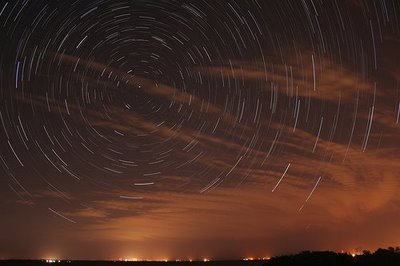
Our image at the top of this post comprises of 8401 separate captures, it took 12 hours to complete the stack, running on our Mac overnight. Star trails will not require such a long exposure, perhaps a few hours and thus a smaller number of images will be sufficient.

In our image the long line is a star with the crescent moon streaking on the left before going behind clouds and finally the rest of the lights detail air traffic over the London skyline. If you are in a low light pollution area you will be able to quickly and easily capture images such as the one below:

Image by e20ci on Flickr

You can view our image in higher resolution via our Flickr Photostream.

Any thoughts/comments/questions welcome as ever…

Tutorial: Image Stacking for Star Trails and City Air Activity at Night

By Air Activity, Helicon Focus, How To, star trails, Tutorial

Our previous tutorial on setting up a Waterproof webcam timelaspe system via a torch and USB extension leads also lends itself to capturing star trails or city activity at night. Being Central London based light pollution filters out the stars to a large extent but with very little effort some interesting images can be captured and if you are located in area with lower light pollution it is perfect for capturing star trails.

Step 1: Capture the Images

Use your webcam via our previous tutorial to capture a image in .png format every 5 seconds throughout the night. This will result in approximately 10,000 images which can be stacked to create a simulated night long exposure.

Step 2: Stack the Images

We found by far the best image stacking option was to use Helcion Focus. Available for both Mac and PC Helicon Focus is a program that creates one completely focused image from several partially focused images by combining the focused areas. The program was designed for macrophotography, microphotography and hyperfocal landscape photography to cope with the shallow depth-of-field problem. It also however is one of the best stacking programs around. Other software we tried would crash above 1000 images whereas Helicon has coped well with up to 10,000 so far.

The software is available for a free 15 day fully functional trial.

1) Download and install Helicon Focus

2) Click ‘Add Images’ and point Helicon to the folder containing your images saved overnight. The software will now load them in, our iMac took approximately 10 minutes to complete the process.

3) We are not using Helicon for macro photography so we can turn off processing, allowing the stacking to run faster. Click ‘File/Preference’ and set ReSample Method to ‘None’.

4) Click ‘Run’

Our image at the top of this post comprises of 8401 separate captures, it took 12 hours to complete the stack, running on our Mac overnight. Star trails will not require such a long exposure, perhaps a few hours and thus a smaller number of images will be sufficient.

In our image the long line is a star with the crescent moon streaking on the left before going behind clouds and finally the rest of the lights detail air traffic over the London skyline. If you are in a low light pollution area you will be able to quickly and easily capture images such as the one below:

Image by e20ci on Flickr

You can view our image in higher resolution via our Flickr Photostream.

Any thoughts/comments/questions welcome as ever…
Close Menu

About Salient

The Castle
Unit 345
2500 Castle Dr
Manhattan, NY

T: +216 (0)40 3629 4753
E: hello@themenectar.com

Archives