Book Review – Wikinomics

By Book Reviews, Currently Reading


The last couple of years or so has seen a sea change in social spaces, collaborative informational spaces and mass sharing of media on the web, in short the web has come of age. As such Wikinomics is timely, examining the rise of sites such as Second Life, MySpace and Wikipedia, amongst others.

Partly marketed as a management book it is in fact a good general read and almost essential reading for anyone involved in the area of social, virtual or new media spaces. Based on a 9$ million research project, Wikinomics shows how masses of people can participate in the economy like never before.

The books comes highly recommend and as mentioned essential for anyone researching, involved in, or thinking of starting their own collaborative space.

You can purchase it, currently at discount, via our associate store at Amazon along with other books on our recommend reading list.

South Pacific Railway Panorama

By Panoramas 90-100

On a drive out of San Francisco, on route to the Napa Valley, we came across an abandoned train which turned out to be part of the South Pacific Coast Railroad.

Wikipedia describes the railway as –

“a 3 ft (914 mm) gauge narrow gauge steam railroad running between Santa Cruz, California and Alameda, with a ferry connection in Alameda to San Francisco. The railroad was created as the Santa Clara Valley Railroad, founded by local strawberry growers as a way to get their crops to market in San Francisco and provide an alternative to the Southern Pacific Railroad. In 1876, James Graham Fair, a Comstock Lode silver baron, bought the line. He extended the line into the Santa Cruz Mountains in order to capture the significant lumber traffic coming out of the redwood forests.

In 1887, the line was acquired by the Southern Pacific and the gauge standardized. In later years, the segment running between San Jose and Santa Cruz was used by SP’s “Suntan Special” which came down the San Francisco Peninsula and took passengers right to the beach and boardwalk in Santa Cruz. Service was disrupted by the 1906 Earthquake[1]. The tracks through the Santa Cruz Mountains suffered major damage during a storm in the winter of 1940, and the line was abandoned the same year.”

The panorama was captured in High Dynamic Range giving it a slightly unreal look:


We dont normally tweak our panoramas but this scene works well in sepia – providing a slighly surreal look at the old South Pacific Railroad:

You can view both the High Dynamic Range panorama (3.62Mb) in Quicktime Virtual Reality and the Sepia Version (3.31Mb).

How to Geotag Photographs on the Nokia N95 for Google My Maps and Flickr

By Google My Maps, Join the Digital Urban Flickr Group, N95


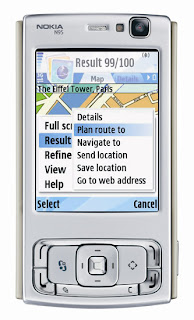
Its taken a bit of time to work this one out but with a few simple steps you can capture geotagged photographs on your Nokia N95, upload to Flickr and then add them to Google’s My Maps.
The process is simple:
Initial Set Up
1) First off go to ShoZu.com – Shozu is freely available software that allows you to both geotag photographs on your N95 and upload to a number of online services, in our case Flickr.
Sign up with the site and select the Nokia N93 as your phone (the N95 is not yet listed). You will be asked to set up a user name and password as well as your mobile number. Once registered ShoZu will send a text along with a link to download the software. We downloaded via a Wi-Fi link to make sure we didn’t incur any phone charges;
2) Install ShoZu on your N95 and login to your account using the username and password you set up. This will authenticate your account allowing you to log back into the web based service and set up a number of destinations to upload your photographs;
3) To enable uploading to Flickr go to the web page and selecting the ‘Share It’ tag. Now simply go through the process of allowing ShoZu the required rights to upload to your account.
This completes the set up ShoZu in terms of services, we now simply need to turn on GPS tagging;
4) Open ShoZu on your N95 and go to: Options/View and then the images tag which is indicated by a film strip icon. The 4th option is GPS Tagging, switch this to On.
Capturing and Uploading
1) Open either Nokias ‘Maps’ or the ‘Sports Tracker‘ application and make sure you are getting a GPS fix, we use Sports Tracker as it allows us to additionally upload our route to Google Earth/Maps;
2) Start taking your pictures, with ShoZu installed each photograph will have a location tag written into its EXIF information.
3) Open ShoZu and select Share-It/All files, this will display a list of your photographs. Select the image your want to upload and click Options, this displays the choice to Send to Flickr. Select send and your image will be uploaded, again we uploaded via Wi-Fi to minimise any data charges.
Your images will now be available on your Flickr page and automatically geotagged. Within Flickr you can choose to view by map which opens a Yahoo Map page, we prefer Googles My Maps options:

1) At the bottom of your Flickr Photos page you will see a RSS Feed Icon and the Feed link – Right click on this link and copy the link location;
2) Login into your Google Maps account and paste the feed location into the search box – now add the following to the end of the paste ‘&georss=true’ (without the ‘)
3) Running the search will display your photographs from the N95 on Google Maps via Flickr, to add them to My Maps simple click on each icon and choose ‘Save to My Maps’

You can view our geotagged images from the Nokia N95 on our My Maps page.

Updates..

By Posts

At the moment we are working on a walk through to geo-tag your photographs with a Nokia N95. This should be ready tomorrow – we can’t try it yet as our battery has just gone flat – but we are confident it will work.

Still getting back into things at work but news on the AAG conference, Google Earth and Microsoft Live to follow soon as i have time to post…

Also an update of the RealViz Stitcher review is on its way as well as that Oblivion tutorial…

Close Menu

About Salient

The Castle
Unit 345
2500 Castle Dr
Manhattan, NY

T: +216 (0)40 3629 4753
E: hello@themenectar.com

Archives