London Twitter Cloud

By geo Twitter, Google Earth, london, Tweet-o-Meter, Twitter, Twitter Data

Regular readers will know we have been logging data in 12 cities via our Tweet-o-Meter, its still early days but the results for a weekend in London are intriguing.

The data covers a weekend period from Friday evening to Monday morning containing 380,000 individual tweets. Within these 60,000 were geo-referenced, tweeted by 5,500 individual users.

In terms of density the focus is on central London with local hotspots as the weekend progresses, around Kings Cross and Old Street. There is also a noticable trace along the main transport routes into and out of town, noting that we seem to be tweeting while on the move. The clip below details the visualisation in Google Earth:

Music – ‘Social Awkwardness‘ by Xanthe  over on unsigned bands.

The clip reveals a message cloud rising and hovering above London as a time-space aquarium where the time is plotted as the height information. Interestingly Google Earth is becoming the visualiser of choice for such data sets, the combination of location, imagery with the ability to view by time makes it a formidable engine for data visualisation.

Thanks go to urbantick who converted the data via a custom VB script.

Image Stacking: 8400 Images – Day and Night in the City

By City Timelapses, Day Trails, go pro hd, Image Stacking, star trails

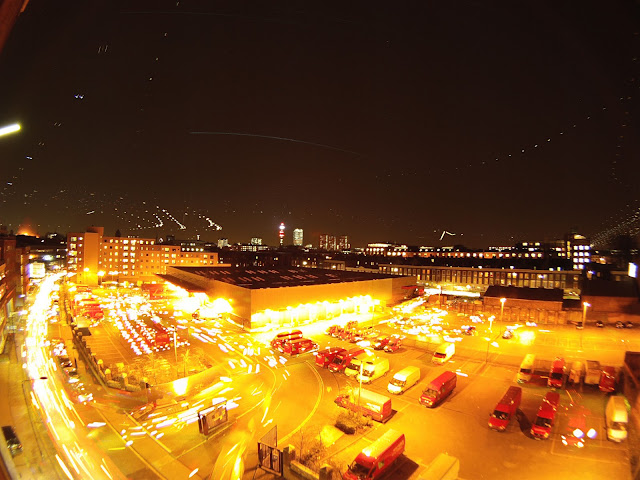
Using our recent tutorial on image stacking it is possible to stack images from both day and night to create a single image of the city skyline over time. The photograph below consists of 8400 images taken using a Go Pro HD with one image every 5 seconds. The streak of light to the left is the moon during the night time sequence, while the right hand light is the daytime sun. The small lights are aircraft during the evening:

You can view a higher resolution version on our Flickr Stream, we will have more on the Go Pro HD next week, including a tutorial to create 24 hour+ timelapses.

Image Stacking: 8400 Images – Day and Night in the City

By City Timelapses, Day Trails, go pro hd, Image Stacking, star trails

Using our recent tutorial on image stacking it is possible to stack images from both day and night to create a single image of the city skyline over time. The photograph below consists of 8400 images taken using a Go Pro HD with one image every 5 seconds. The streak of light to the left is the moon during the night time sequence, while the right hand light is the daytime sun. The small lights are aircraft during the evening:

You can view a higher resolution version on our Flickr Stream, we will have more on the Go Pro HD next week, including a tutorial to create 24 hour+ timelapses.

Photoshop Tutorial: City Star and Aircraft Trails

By city photography, city trails, star trails, Tutorial

Last week we covered creating ‘day trails’ in Photoshop using the technique in Astrophotography known as ‘star trails’. Today we take the same technique and use it to create a view of city activity at night.

You will need:

1 x Timelapse System, you can use a simple webcam as per our previous Tutorial: Torch + Webcam = HD Timelapse System a DSLR such as the Canon G9 with CHDK , a iPhone with the free Gorrilacam app or any camera that can take photos at regular intervals. We used a Go Pro HD camera in timelapse mode, taking a picture every 5 seconds.

1 x Copy of Photoshop, you can download a 30 day trial.

1 x Photoshop Stacking Action (thanks to Deep Space Astrophotography)

Time Taken, 4 to 12 hours to capture, 2 to 6 hours to process.

Setting Up

The concept is simple, set up your camera, webcam or iphone at a suitable location, and capture an image at regular intervals, for our example we captured an image every 5 seconds pointing at the skyline of London. Capturing an image at least every 5 seconds is vital for star/aircraft trails as it allows for closer spacing between the lights in the final image.


We left the camera running for approximately 12 hours capturing 8000+ images, saved into a folder on our computer. Ours captured covered both day and night time, resulting in the following timelapse:

The next step is to open up photoshop, chose the images you want to use, and start stacking.

Image Stacking in Photoshop

The images will be stacked onto of an intially blank image via a simple automated action:

1) Create a new blank black image the same size are your captured photographs.

2) Load the action into the action windows in Photoshop and load the action Startrails.atn.

3) In Photoshop click ‘File’, ‘Automate’ and ‘Batch’. Select the action you have just loaded and choose your directory with the images as source and make sure you select ‘None’ for the output directory.

Click ‘Ok’ and leave it running, our Mac laptop took around an 2 hours to stack the images – resulting in the Start/Aircraft Trail’ below:

The line across the centre is a star and the bright line on the left is the moon coming into shot. The rest of the lights are aircraft in the sky above London.

You can view higher resolution versions via our Flickr Photostream.

Close Menu

About Salient

The Castle
Unit 345
2500 Castle Dr
Manhattan, NY

T: +216 (0)40 3629 4753
E: hello@themenectar.com

Archives