Digital Urban Flickr Group

By Join the Digital Urban Flickr Group


We have set up a DigitalUrban group on Flickr for readers to share any urban photos or 3D renders relating to the built environment. So far we have 12 images online and welcome the first member – James Bell of the excellent panorama site jamesbells.com

Its easy to join the group, simply login or set up a Flickr account and click here to join the DigitalUrban Group.

There is also the ability to post questions or thoughts in the discussion link. If you have any photographs you would like to share we encourage you to join – we might even set up a monthly prize for best urban image 🙂

Urban Images with Flickr/Splashr

By Posts

We’ve been slow on the uptake with Flickr but we finally have some photos uploaded as the result of the new tool from Splashr to display images. Thanks go to Digital Geography for the pointer to this.

As can be seen above you can use Splashr to create a simple presentation tool for any set of Flickr images (click the images to have a go). Its easy to use and well worth a try..

You can view the image presentation full screen from here (much better as they are tiny on the blog!).

We hope to get some more images up on Flickr asap – if anyone has any Flickr tips and tricks or groups to join let us know. To view our photographs direct in Flickr, click here.

CASA Announces Google Map Creator

By Download Software

Google Map Creator is a freeware application designed to make thematic mapping using Google Maps simpler. The software is part of the GeoVUE project at CASA, sponsored by the ESRC as a node in the National Centre for e-Social Science.

Available as a free download the software enables a user to import a .shp files and export the data overlayed on Google Maps. Using Google Map Creator it is a simple three step process to go from raw data to visualization on your own webserver. Differing considerably from other similar .shp convertors, the software is available as freeware and aimed at ease of use.

In the pre-release stage a variety of thematic map for different parts of the world were produced to test the viability of the application with real data on production web servers. A complete set of help documentation is provided as well as a worked example providing a step by step guide to creating your first Google Map from .shp data.

You can download Google Map Creator and view the online documentation from here.

ESRI ArcGIS Explorer Beta – GIS for Everyone (?)

By ArcGIS Explorer

ESRI’s ArcGIS Explorer loads with the banner ‘GIS for Everyone’. At a first look however the beta product has a long way to go before it allows GIS for the masses.

The main plus point of Explorer is its license free distribution, allowing local government to install it on their desktops, which is not possible with Google Earth unless they pay for the pro version. This alone makes Explorer a inviting prospect for data visualisation and query. Combine this with the possibility to import .shp files and carry out GIS functionality via a ArcServer linkage and its a product that does indeed have the potential to offer GIS for Everyone.

At the moment however it appears to be slow, clunky and lacking features that users of other Digital Globes – such as Google Earth – are used to. As a first test we loaded up our KML file of London, which now extends cover 2000km of the city. Each section of London is divided into KML Network Links allowing each model to seamlessly load in Google Earth. Explorer on the other hand is not able to load the top level KML file, resulting in the the global view zooming into Africa.

We finally found a way around this by opening the files individually but the render times are painfully slow on a machine with 3Gb of ram and a top end graphics card. Where as in Google Earth we can fly around the city with smooth framerates, in Explorer the scene redraws frequently leading to a frustrating load times and a poor data viewing experience.
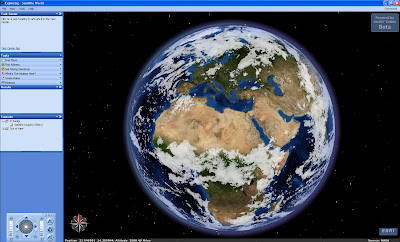

Google Earth excels in the ability of the user to drag a image around the globe and self geo-reference. Explorer, on the other hand, will not allow to the user to load a raster overlay without a spatial reference file. This is exasperating and clearly goes against the aim of GIS for Everyone – if you have to know about spatial co-ordinate systems to load in a simple .jpg or .tif file how can it be GIS for Everyone (?).

At first look ArcGIS Explorer is sadly disappointing with poor rendering of KML files and the ability to add data only if you are GIS literate.

We hope these issues can be sorted out before its full release.

Close Menu

About Salient

The Castle
Unit 345
2500 Castle Dr
Manhattan, NY

T: +216 (0)40 3629 4753
E: hello@themenectar.com

Archives