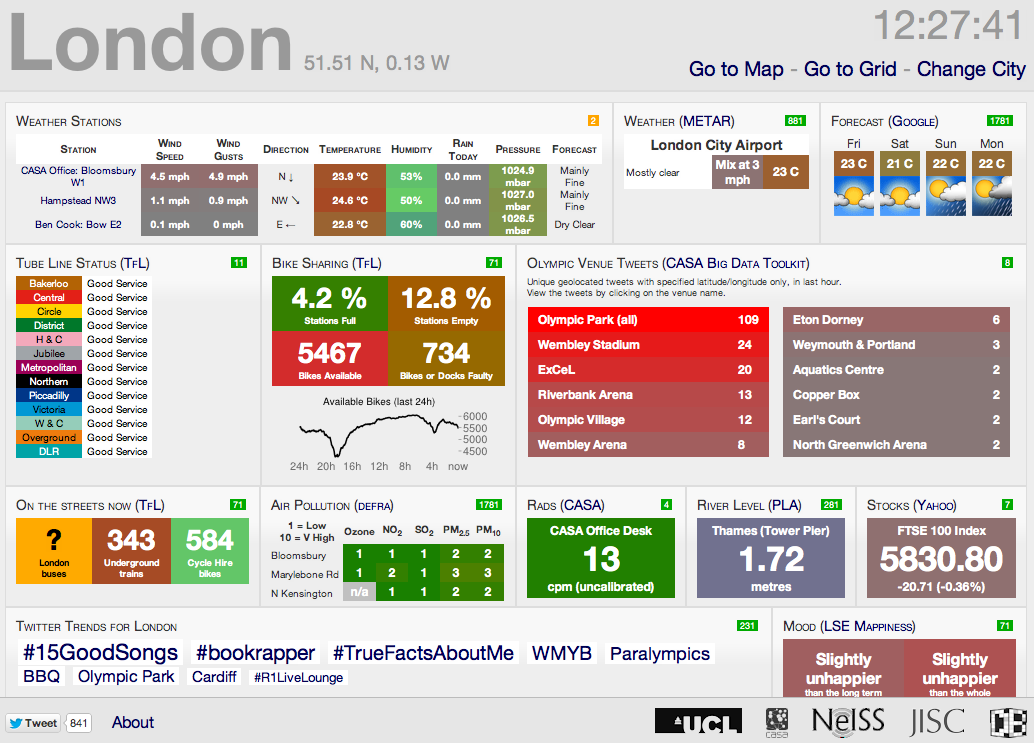
Ollie here in CASA has just posted a new temporary panel on the London CityDashboard which shows Twitter activity at the London 2012 venues. The panel is using data from new Twitter collector tools in the Big Data Toolkit, developed by Steven James Gray, again CASA, as part of his PhD.

As Ollie notes ‘for each venue, the collectors count the number of Tweets in the last hour that have latitude/longitude information stamped on them, that are located within an area radiating around the centre of each stadium or arena. Its worth noting that this excludes the majority of relevant tweets, as most mobile Twitter applications don’t include this information by default’, you have to turn on Geo Location.
So far the Olympic collectors set up by Steven (@frogo) have 22 machines each collecting Tweets from each of the Olympic venues all over London and we have managed to collect over 1.4 million tweets from the last 14 days of the Olympics (Each has been sent from the vicinity of each venue hence why the individual numbers are low).
 The Big Data Toolkit will be entering a beta testing phase in the next couple of months, to allow anyone to collect and map tweets – the aim is to make it as easy as possible while also maintaing the feed for data analysis.
You can view the live data either within our other feeds via our London CityDashboard or direct at http://bigdata.casa.ucl.ac.uk/olympics/
For more detailed information take a look at Ollie’s Suprageography site and Steven’s Big Data Toolkit.
The Big Data Toolkit will be entering a beta testing phase in the next couple of months, to allow anyone to collect and map tweets – the aim is to make it as easy as possible while also maintaing the feed for data analysis.You can view the live data either within our other feeds via our London CityDashboard or direct at http://bigdata.casa.ucl.ac.uk/olympics/
For more detailed information take a look at Ollie’s Suprageography site and Steven’s Big Data Toolkit.